Purpose: Learn about the Agent CRM "Integrated Phone Calls" object and the most critical fields for logging and tracking your phone calls with your clients using the RingCentral Integration.
TABLE OF CONTENTS
- What is the "Integrated Phone Calls" Object?
- What Are the "Integrated Phone Calls" Fields?
- Related
- Need Help?
What is the "Integrated Phone Calls" Object?
The Integrated Phone Calls object is specifically designed for our RingCentral Integration, which allows you to make and track phone calls with your clients and automatically record those call logs—all from within your Agent CRM! Whenever you make a call with a new lead or a client, a new Integrated Phone Call record is created with essential call details, including phone number, duration, and the call recording, which can be stored as files or linked to the RingCentral database. You can connect these calls directly to the related Contact record with the matching phone number, making tracking communication and keeping critical records organized and seamless.
To find these fields:
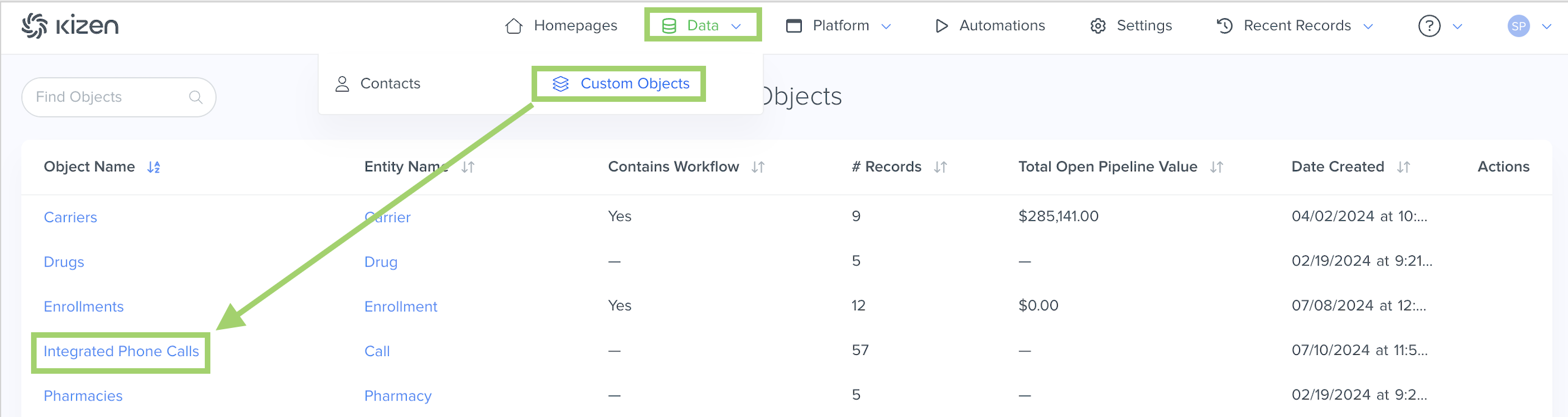
- Click on "Data" in the top menu bar > "Custom Objects" > "Integrated Phone Calls" OR "Platform" > "Custom Objects" > "Integrated Phone Calls" (depending on your toolbar template).
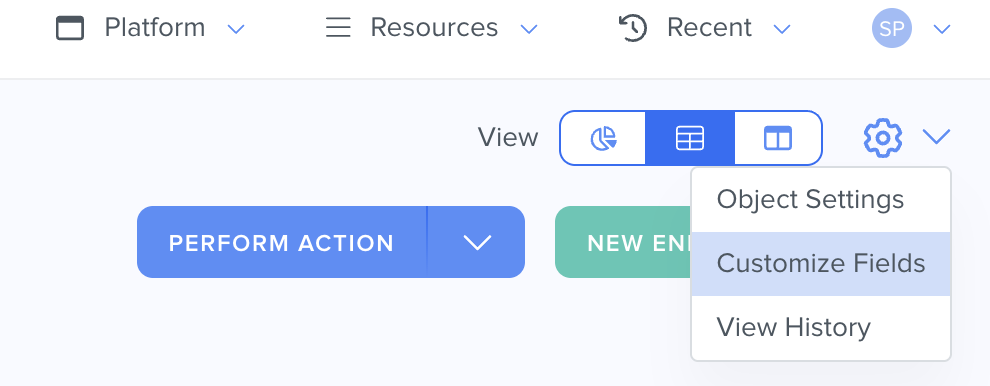
- Click on the gear icon in the top right > Customize Fields.
⚠️ Warning: It's crucial that you do not change the field API name for any of the Agent CRM default fields, as this can potentially break integration configurations.What Are the "Integrated Phone Calls" Fields?
See below for a list of all of the fields that come in the pre-built Integrated Phone Calls object and some important things to consider for your Agent CRM workflow.
| Field Name | Field API Name | Field Type | Field Options | Notes |
| Call Name | name | text | The Call Name field is the auto-generated unique identifier (with the date and timestamp) for the Integrated Phone Calls object. No two Calls can have the same name. | |
| Date Created | created | datetime | The Date Created field is the date and time the call record was logged. | |
| Owner | owner | team_selector | ||
| Related Contact Records | related_contact_records | relationship | The Related Contact Records field is a Relationship field to display the Contact with the matching phone number as the phone call. | |
| Duration | duration_seconds | integer | The Duration field displays the length of the call in seconds. | |
| Team Member | team_member | team_selector | ||
| Phone Number | phone_number | phonenumber | The Phone Number field displays the phone number that the call was made to or received from. | |
| Direction | direction | radio | Inbound Outbound | Indicates whether the call was inbound (recieved) or outbound (initiated by an agent). |
| Call Recording Link | call_recording_link | text | The Call Recording Link field displays the URL to the RingCentral call. | |
| Call Recording | call_recording | files | The Call Recording field contains the audio recording (mp3) file from the call. | |
| Additional Notes | additional_notes | longtext | The Additional Notes field displays any notes you want to add about the phone call. | |
| Display Name | display_name | text | The Display Name field is a read-only field that displays the name of the record. | |
| Session ID | session_id | text | ||
| Last Modified | updated | datetime | The Last Modified field displays the most recent date and time that the record was updated. |
Related
- Upload Your Contacts Into Agent CRM
- Add a New Custom Field
- Agent CRM: "Contacts" Object Overview
- Agent CRM: RingCentral Integration Overview
Need Help?
If you encounter any issues or have additional questions, reach out to support@kizen.com.
Was this article helpful?
That’s Great!
Thank you for your feedback
Sorry! We couldn't be helpful
Thank you for your feedback
Feedback sent
We appreciate your effort and will try to fix the article