Purpose: Learn about the "SunFire Saved Sessions" object that comes pre-built in the Agent CRM product for your insurance agent needs.
TABLE OF CONTENTS
- What is the "SunFire Saved Sessions" Object?
- What Are the "SunFire Saved Sessions" Fields?
- Related
- Need Help?
What is the "SunFire Saved Sessions" Object?
Kizen's SunFire Integration allows you to seamlessly sync your clients' quotes and enrollments directly to your Agent CRM, as well as their medications, pharmacies, and healthcare providers. Every time you open SunFire from Kizen using the "Launch SunFire" button in a Contact record and update information in SunFire, this creates a session record in the "SunFire Saved Sessions" object. This is more for back-end purposes, but this may be useful for you for tracking or troubleshooting purposes. If you do not see an Enrollment appear on your client's Contact record, for example, you can check the SunFire Saved Sessions to see if there is any information being passed back to Kizen from SunFire at all.
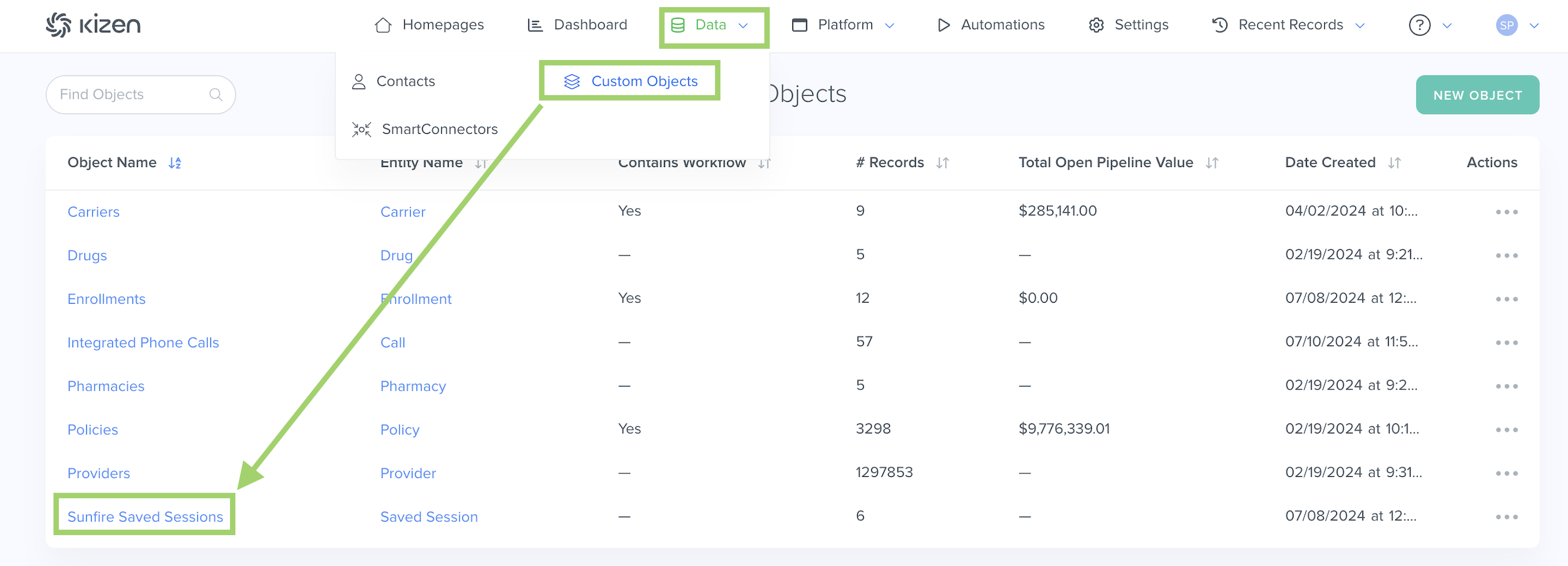
To find this object:
- Click on "Data" in the top menu bar > "Custom Objects" OR "Platform" > "Custom Objects" (depending on your toolbar template).
- Click on the SunFire Saved Sessions object.
⚠️ Warning: It's crucial that you do not delete any Agent CRM default fields or change the field API name for any of the Agent CRM default fields, as this can potentially break integration configurations.What Are the "SunFire Saved Sessions" Fields?
See below for a list of all of the fields that come in the pre-built SunFire Saved Sessions object and some important things to consider for your Agent CRM workflow.
| Field Name | Field API Name | Field Type | Notes |
| Saved Session Name | label_name | text | The "Saved Session Name" is the unique, auto-generated identifier for the SunFire Saved Sessions object. |
| Date Created | created | datetime | The "Date Created" field is the date and time the record was added to the object. |
| Owner | owner | team_selector | The "Owner" field will display the owner of the SunFire integration connection. |
| Last Modified | updated | datetime | The "Last Modified" field displays the most recent date and time that the record was updated. |
| Most Recent for Applicant | most_recent_for_applicant | relationship | The "Most Recent for Applicant" field is a Relationship field with the Contacts object. This will only display the related Contact if it's the most recent Saved Session from SunFire. |
| Applicant | applicant | relationship | The "Applicant" field is a Relationship field that displays the Contact for the SunFire session. For the integration to sync the correct Contact record, you must launch SunFire from the Contact record in the Agent CRM first. |
| Enrollments | enrollments | relationship | The "Enrollments" field is a Relationship field that displays the related insurance policy enrollment that was created in SunFire. |
| Webhook Payload | webhook_payload | longext | The "Webhook Payload" field displays the data package or message sent automatically by one system to another via webhook. |
| Display Name | display_name | text | The "Display Name" field is a read-only field that displays the name of the record. |
Related
- Agent CRM: "Contacts" Object Overview
- Agent CRM: "Enrollments" Object Overview
- Agent CRM: SunFire Integration Overview
- Agent CRM: Connecture Integration Overview
Need Help?
If you encounter any issues or have additional questions, reach out to support@kizen.com.
Was this article helpful?
That’s Great!
Thank you for your feedback
Sorry! We couldn't be helpful
Thank you for your feedback
Feedback sent
We appreciate your effort and will try to fix the article