Purpose: Learn about the "Drugs," "Pharmacies," and "Providers" objects that come pre-built in the Agent CRM product for your insurance agent needs.
TABLE OF CONTENTS
- What Are the "Drugs," "Pharmacies," & "Providers" Objects?
- What Are the "Drugs" Fields?
- What Are the "Pharmacies" Fields?
- What Are the "Providers" Fields?
- Related
- Need Help?
What Are the "Drugs," "Pharmacies," & "Providers" Objects?
With Kizen's Agent CRM, you can easily track your clients' medications, pharmacies, and healthcare providers — that way, you can find the best insurance plan that works for their specific health needs! Our pre-built "Drugs," "Pharmacies," and "Providers" objects are designed to sync seamlessly from SunFire or Connecture when you complete an enrollment, and they'll connect automatically to your Contacts so that you can access and update this essential data anytime!
To find these fields:
- Click on "Data" in the top menu bar > "Custom Objects" OR "Platform" > "Custom Objects" (depending on your toolbar template).
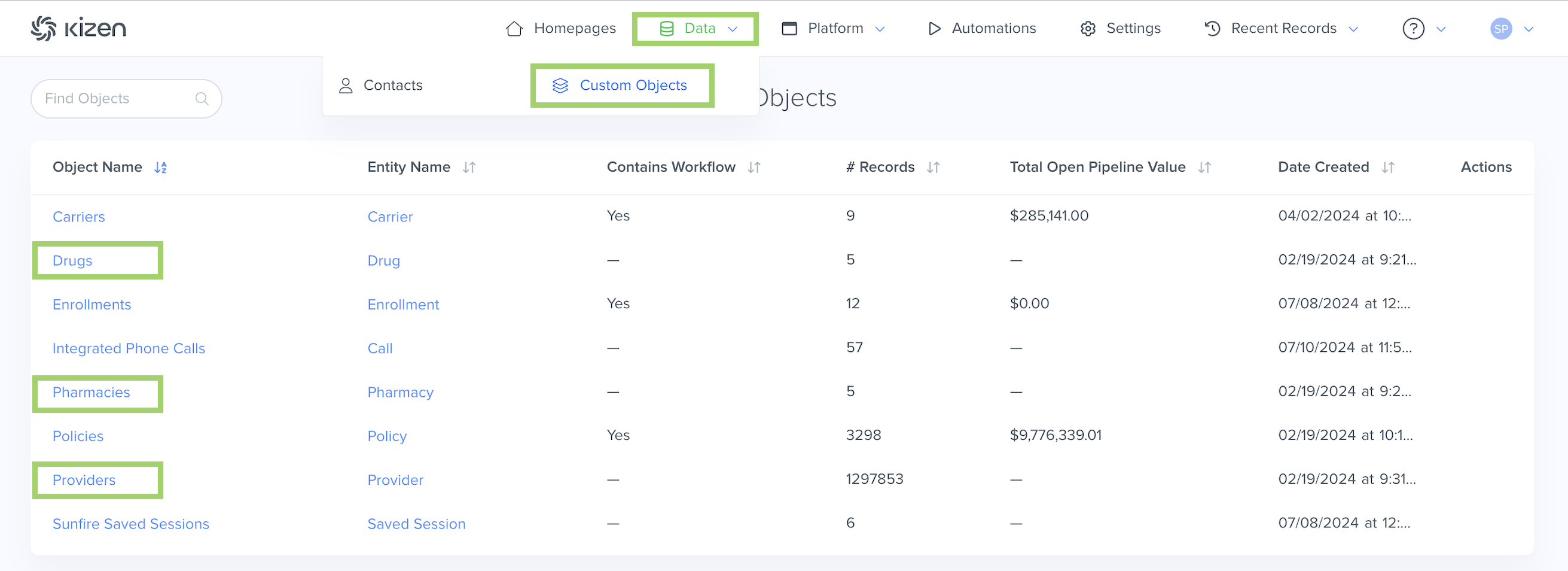
- Click on the Drugs, Pharmacies, or Providers object.
- Click on the gear icon in the top right > Customize Fields.
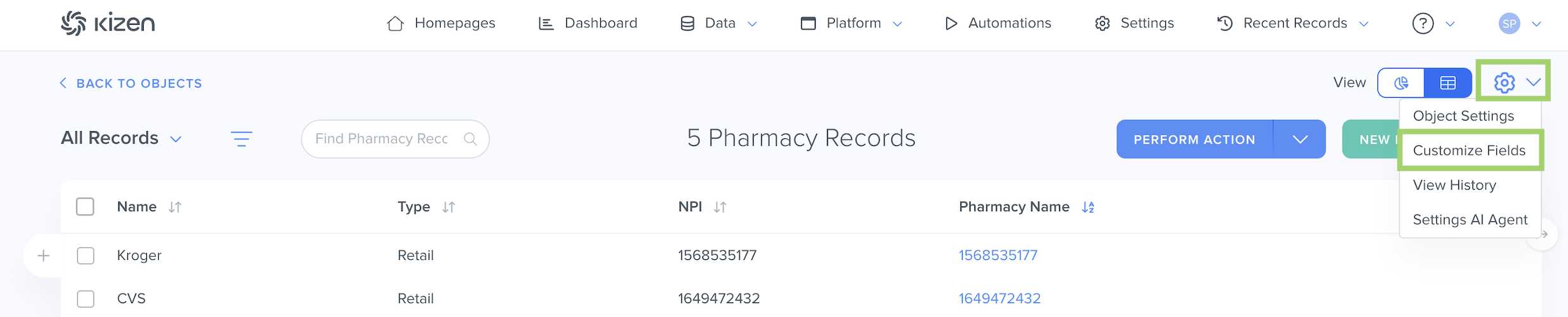
⚠️ Warning: It's crucial that you do not change the field API name for any of the Agent CRM default fields, as this can potentially break integration configurations.What Are the "Drugs" Fields?
See below for a list of all of the fields that come in the pre-built Drugs object and some important things to consider for your Agent CRM workflow.
| Field Name | Field API Name | Field Type | Notes |
| Name and Dosage | label_name | text | The Name and Dosage field displays the specific name of the drug and dosage in a patient-friendly format, for example: "Amoxicillin, 500 mg capsule, 3x daily" |
| NDC | ndc | text | Short for "National Drug Code," the NDC field displays the FDA's unique 10-digit identifier for the specific drug. |
| Quantity | qty | integer | The Quantity field displays the total number of units for the drug (Tablets, Capsules, Liquids, Creams, and Ointments). |
| Frequency (days) | freq | integer | The Frequency field displays the dosage schedule. |
| Drug Name | name | text | The Drug Name field is the unique identifier for the Drugs object. (This is a more standardized reference label than the Name and Dosage field.) No two Drugs can have the same name. |
| Owner | owner | team_selector | |
| Date Created | created | datetime | The Date Created field is the date and time the record was added to the object. |
| Last Modified | updated | datetime | The Last Modified field displays the most recent date and time that the record was updated. |
| Display Name | display_name | text | The Display Name field is a read-only field that displays the name of the record. |
| Contacts | contacts | relationship | The Contacts field is a Relationship field to display each Contact who is on this medication. The reverse Related field on the Contacts object is "Drugs." |
What Are the "Pharmacies" Fields?
See below for a list of all of the fields that come in the pre-built Pharmacies object and some important things to consider for your Agent CRM workflow.
| Field Name | Field API Name | Field Type | Field Options | Notes |
| Name | pharmacy_name | text | The Name field displays the name of the pharmacy. | |
| Type | type | dropdown | Retail | The Type field displays the type of pharmacy, for example a physical retail pharmacy or mail-order prescription service, which may have different compliance requirements. |
| NPI | npi | text | Short for "National Provider Identifier," the NPI field displays the unique 10-digit identification number assigned to healthcare providers, including pharmacies, in the U.S. by the Centers for Medicare & Medicaid Services (CMS). | |
| Pharmacy Name | name | text | The Pharmacy Name field is the unique identifier for the Pharmacy object. No two Pharmacies can have the same name. | |
| Owner | owner | team_selector | ||
| Date Created | created | datetime | The Date Created field is the date and time the record was created. | |
| Last Modified | updated | datetime | The Last Modified field displays the most recent date and time that the record was updated. | |
| Display Name | display_name | text | The Display Name field is a read-only field that displays the name of the record. | |
| Contacts | contacts | relationship | The Contacts field is a Relationship field to display each Contact who is associated with each Pharmacy. The reverse Related field on the Contacts object is "Pharmacies." |
What Are the "Providers" Fields?
See below for a list of all of the fields that come in the pre-built Providers object and some important things to consider for your Agent CRM workflow. To find these fields:
| Field Name | Field API Name | Field Type | Field Options | Notes |
| Full Name | text_1 | text | The Full Name field displays the full name of the healthcare provider. | |
| Alias | alias_name_4e8915 | text | The Alias field displays the shortened name for the healthcare provider. | |
| NPI | npi_ce9d20 | text | Short for "National Provider Identifier," the NPI field displays the unique 10-digit identification number assigned to healthcare providers, including pharmacies, in the U.S. by the Centers for Medicare & Medicaid Services (CMS). | |
| Address | address_fe1155 | longtext | The Address field displays the business address of the healthcare provider. | |
| City | city | text | ||
| State | state | dropdown | AK, AL, AR, AS, AZ, CO ... etc. | If importing healthcare providers from a csv file, the States must be formatted as two-letter state abbreviations. |
| Zip | zip | text | ||
| Last Name | text_2 | text | ||
| Provider Name | name | text | The Provider Name field is the unique identifier for the Providers object. No two Providers can have the same name. | |
| Owner | owner | team_selector | ||
| Date Created | created | datetime | The Date Created field is the date and time the record was created. | |
| Last Modified | updated | datetime | The Last Modified field displays the most recent date and time that the record was updated. | |
| Display Name | display_name | text | The Display Name field is a read-only field that displays the name of the record. | |
| Contacts | contacts | relationship | The Contacts field is a Relationship field to display each Contact who is a patient of the healthcare provider. The reverse Related field on the Contacts object is "Providers." |
Related
- Upload Your Contacts Into Agent CRM
- Add a New Custom Field
- Agent CRM: "Contacts" Object Overview
- Agent CRM: "Carriers" Object Overview
- Agent CRM: Connecture Integration Overview
- Agent CRM: SunFire Integration Overview
Need Help?
If you encounter any issues or have additional questions, reach out to support@kizen.com.
Was this article helpful?
That’s Great!
Thank you for your feedback
Sorry! We couldn't be helpful
Thank you for your feedback
Feedback sent
We appreciate your effort and will try to fix the article