Purpose: Learn about the Agent CRM "Carriers" object and the most critical fields for your insurance agent needs.
TABLE OF CONTENTS
What Is the Agent CRM "Carriers" Object?
Kizen's Agent CRM "Carriers" object is where you can easily manage essential health insurance carrier information, with customized fields for the carriers' product types and value so that you can stay on top of your book of business and commissions. The Carriers object is designed to be easily related to the Contacts who have Enrollments and Policies with each specific Carrier record. Additionally, the "SunFire Carrier ID" field allows you to seamlessly integrate with SunFire for your Medicare enrollment and quoting needs.
What Are the "Carriers" Fields?
See below for a list of all of the fields that come in the pre-built Carriers object and some important things to consider for your Agent CRM workflow. To find these fields:
- Click on Platform > Custom Objects > Carriers

- Click on the gear icon in the top right > Object Settings > Customize Fields
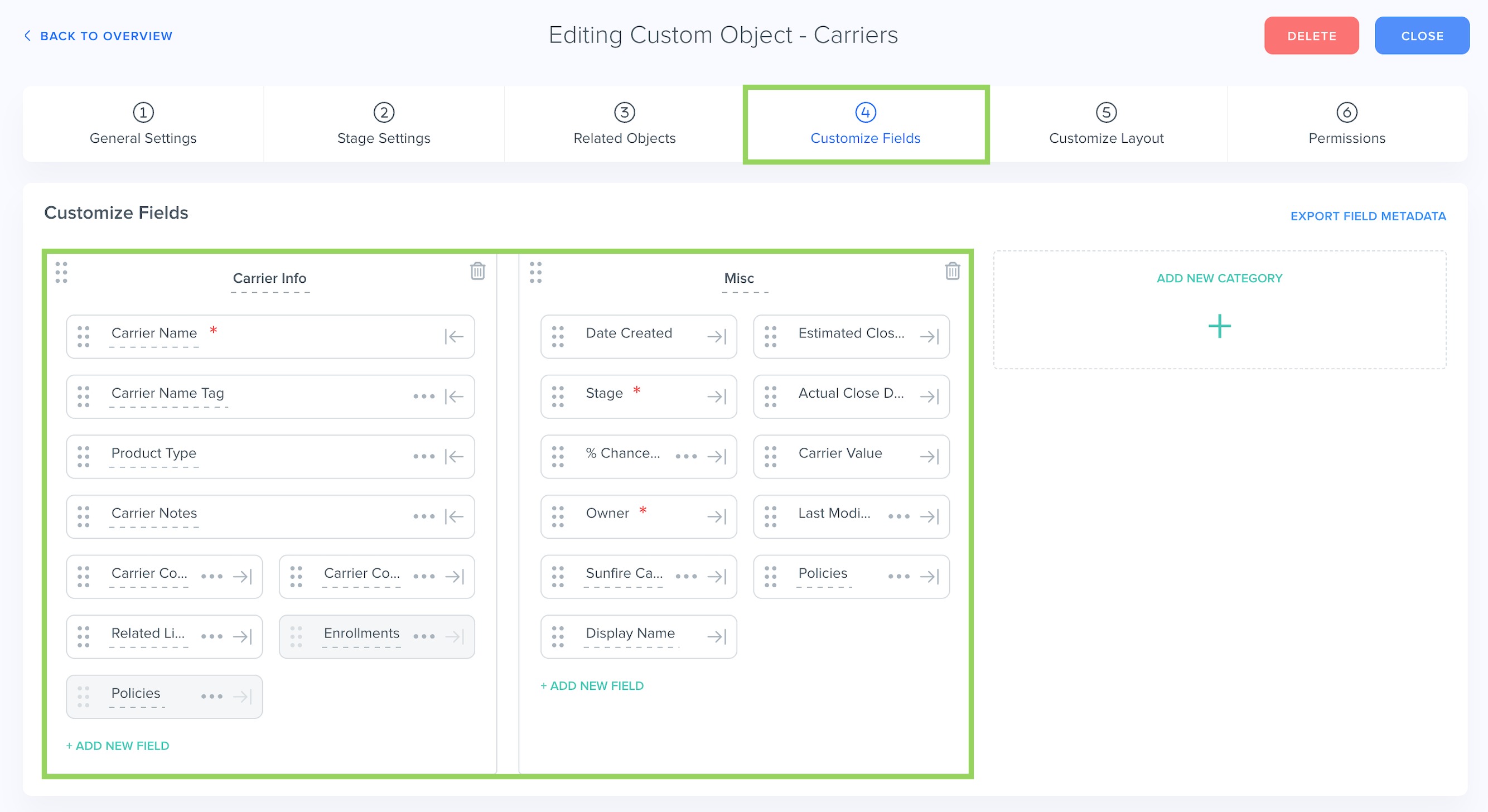
| Field Name | Field API Name | Field Type | Field Options | Notes |
| Carrier Name | name | text | The Carrier Name field is the unique identifier for Carriers. No two Carriers can have the same name. | |
| Carrier Name Tag | carrier_name_tag | dynamictags | Aetna Allstate Anthem Humana UHC Wellcare | The Carrier Name Tag field is an optional field that you can use to display the carrier name as a Dynamic Tag. |
| Product Type | product_type | dynamictags | Life MA MSUP | The Product Type field is a Dynamic Tags field to display the different types of insurance products the carrier sells. For example: Life insurance, MA (a.k.a. Medicare Advantage), or MSUP (Medicare Supplement). |
| Carrier Contacts | carrier_contacts | relationship | The Carrier Contacts field is a Relationship field to display each Contact who has a plan with this Carrier. On the Contact record, this field is "Contact For Carrier." | |
| Carrier Notes | carrier_notes | longtext | ||
| Reasons Lost | reasons_lost | dynamictags | ||
| Reasons Disqualified | reasons_disqualified | dynamictags | ||
| Enrollments | enrollments | relationship | The Enrollments field is a Relationship field to display which Enrollments are with this Carrier. | |
| Policies | policies | integer | The Policies (integer) field counts the number of Policies for each Carrier record. | |
| Date Created | created | datetime | The Date Created field is the date the specific Carrier record was added to the Carrier object. | |
| Estimated Close Date | estimated_close_date | date | ||
| Stage | stage | dropdown | Stage 1 | |
| Actual Close Date | actual_close_date | datetime | ||
| % Chance to Close | percentage_chance_to_close | integer | ||
| Carrier Value | entity_value | money | The Carrier Value field records the monetary value of each Carrier. This is useful for tracking your commissions. | |
| Owner | owner | team_selector | ||
| Last Modified | updated | datetime | The Last Modified field displays the most recent date and time that the Carrier record was updated. | |
| SunFire Carrier ID | sunfire_carrier_id | text | The SunFire Carrier ID field displays the unique ID for each Carrier record in SunFire. This is useful for the SunFire integration. | |
| Policies | policies_1 | relationship | The Policies field is a Relationship field to display which Policies are with this Carrier. | |
| Display Name | display_name | text | The Display Name field is a read-only field that displays the name of the record. |
⚠️ Warning: It's crucial that you do not change the field API name for any of the Agent CRM default fields, as this can potentially break integration configurations.Related
Need Help?
If you encounter any issues or have additional questions, reach out to support@kizen.com.
Was this article helpful?
That’s Great!
Thank you for your feedback
Sorry! We couldn't be helpful
Thank you for your feedback
Feedback sent
We appreciate your effort and will try to fix the article