Purpose: Learn how the Policy Sync feature can sync your downline agents’ policies and clients from your FMO account to their individual Agent CRMs.
TABLE OF CONTENTS
- What is the Policy Sync feature?
- How to enable Policy Sync for an Agent CRM account
- Things to consider about the Policy Sync
- Related Articles
- Still Need Help?
What is the Policy Sync feature?
We know how important it is to have all of your data in a single, easy-to-use platform—especially when you’re juggling thousands of clients across multiple insurance carriers. That’s why we built the Policy Sync feature! Using SmartConnectors, our seamless data integration technology, we process policy and member records directly from your carriers and upload them into your FMO account and your downline agent’s Agent CRM accounts.
The Policy Sync feature was designed specifically with HIPAA compliance in mind. When you create an Agent CRM account for one of your downline agents or agencies, only their existing policies where their NPN is listed as the Writing Agent will be synced to their Agent CRM account’s Policies object. You can rest assured that only authorized individuals will have access to their respective policies.
Best of all, the Policy Sync feature will automatically create new Contact records for policy members so that your agents can hit the ground running with their CRM!
How to enable Policy Sync for an Agent CRM account
⚠️ Note: This guide is for FMO administrators only. If you are a downline agent, please reach out to your FMO contact for more details.When creating a new Agent CRM account
When provisioning a new Agent CRM account on behalf of a downline agent or agency, you have the option to enable the Policy Sync so that their account can be created with their respective Policies and Contacts already uploaded. After that, whenever any new policy record with the NPN is created in the FMO business, this will also sync over to the relevant CRM business.
- On the Agent or Agency record, select “Log Activity” > “[Agent CRM] Provision New Agent Business Activity” from the dropdown menu.
- Fill out the required fields for the new Agent CRM.
- Select the “Enable Policy Sync” checkbox.
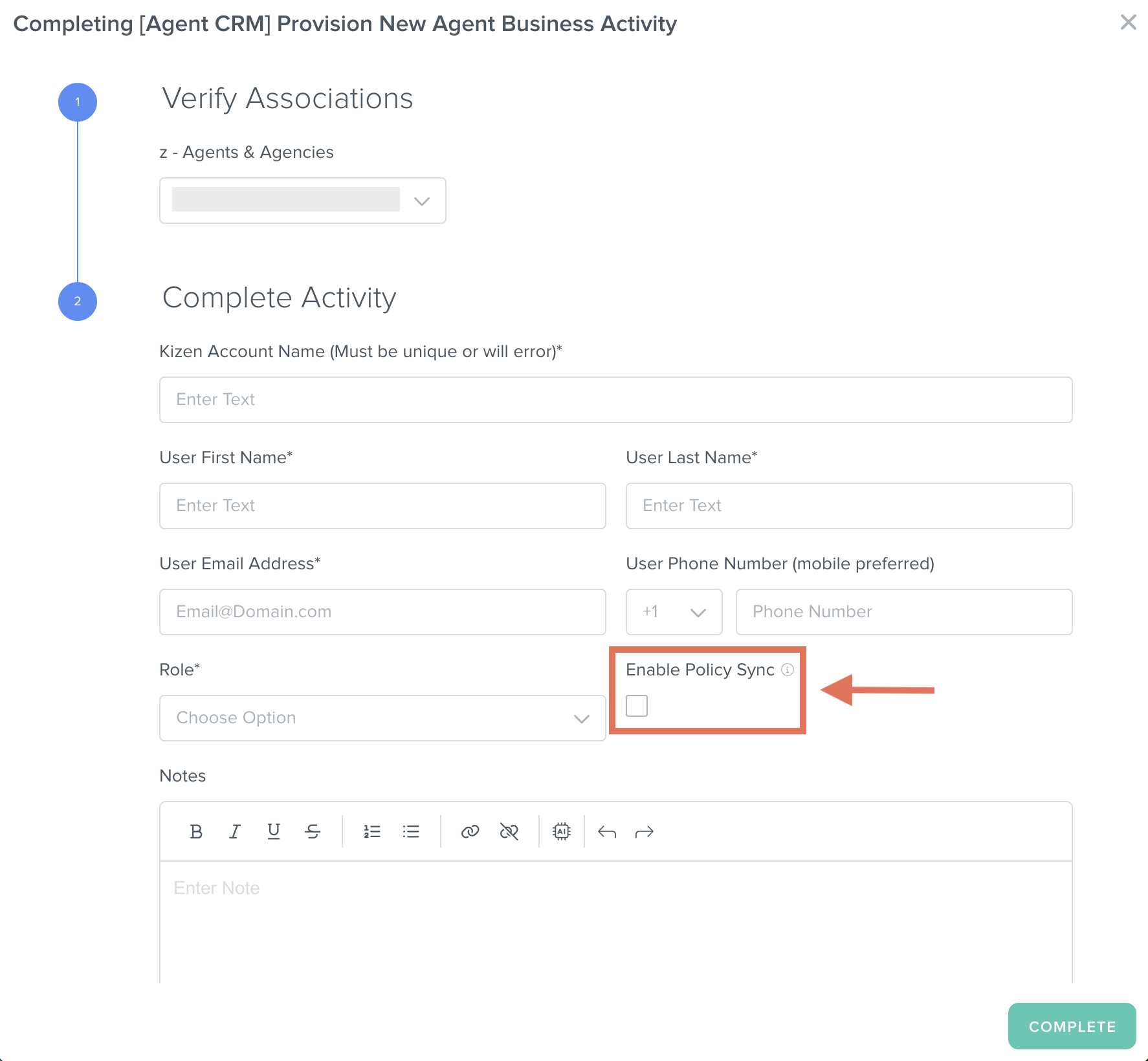
- Select the "Complete" button.
Any policies in your FMO account’s Policies object with the provisioned Agent/Agency’s NPN as the Writing Agent will sync to their Agent CRM account.
After an Agent CRM account has already been created
There may be scenarios where you need to enable the Policy Sync feature after an Agent CRM account has already been created.
- On the Agent CRM Business record, select "Log Activity" > “[Agent CRM] Enable/Disable Policy and Member Sync” from the dropdown menu.
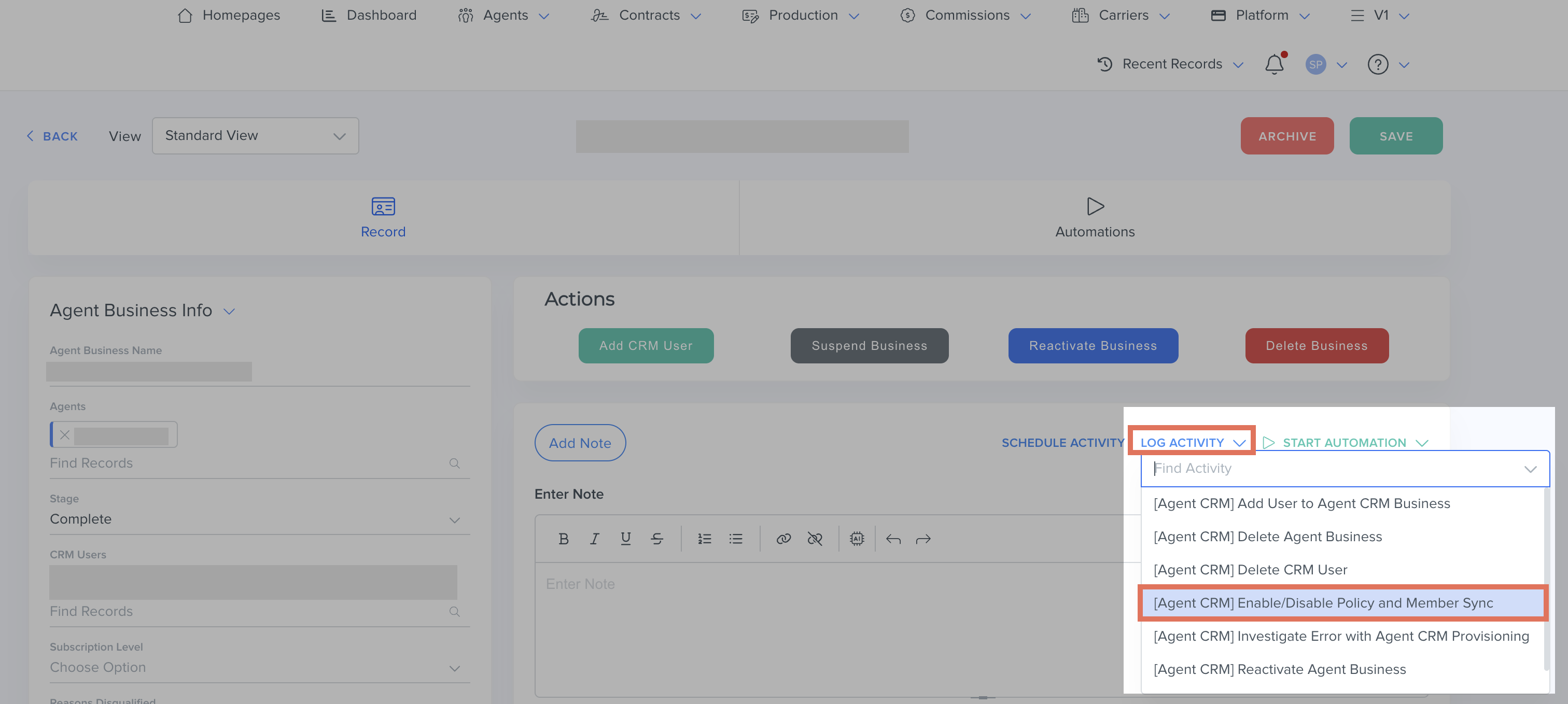
- If the Agent CRM Business currently does not have policy sync enabled, select the "Policy Sync Enabled" checkbox.
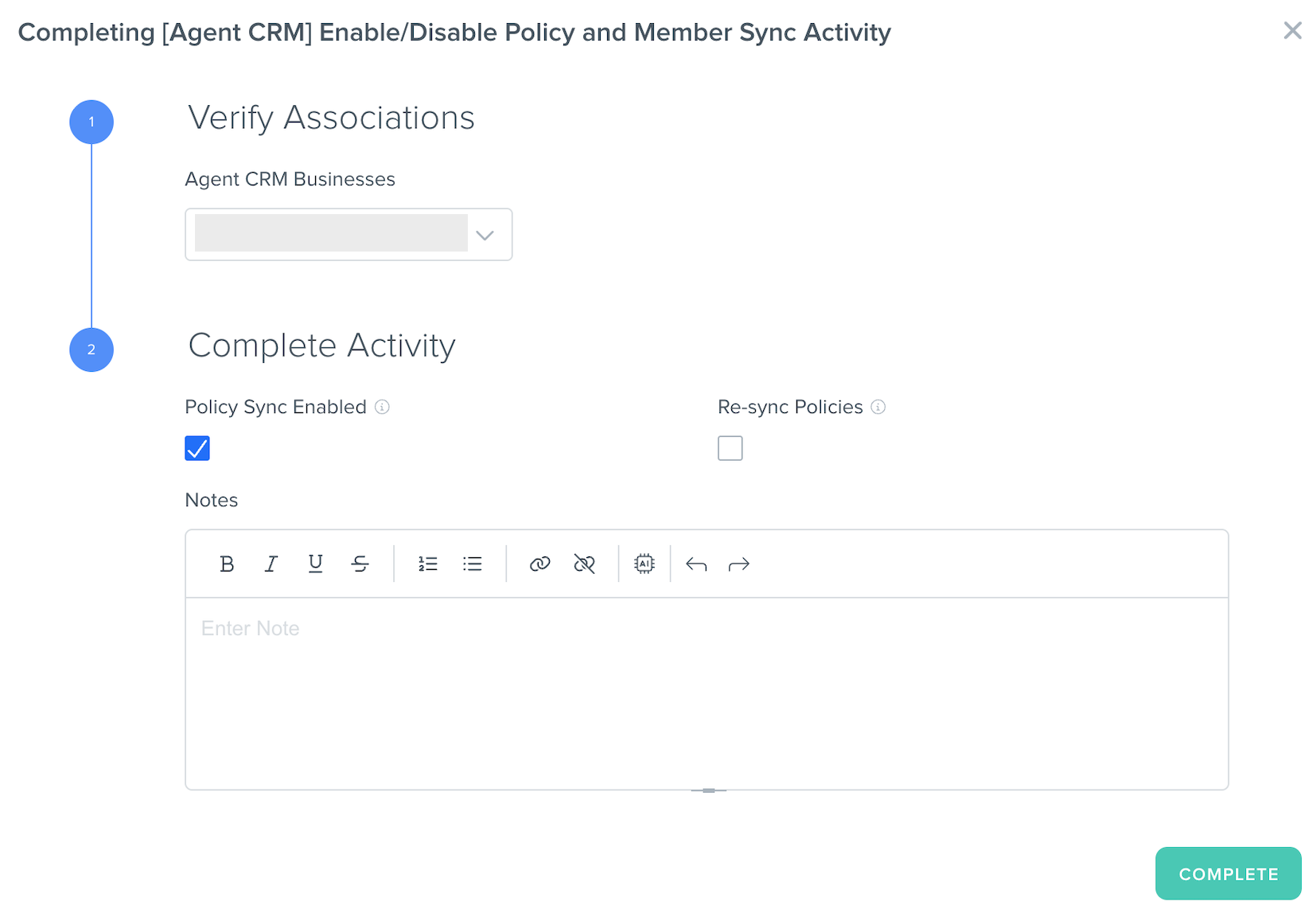
- If the Agent CRM Business already has policy sync enabled, the checkbox for "Policy Sync Enabled" will already been checked, and you will need to select "Re-sync Policies."
- Select the "Complete" button.
Things to consider about the Policy Sync
- When provisioning an Agency CRM account: If the principal agent writes business under their Agency’s NPN as well, the number of policies (and therefore Contacts created from those policies) they expect to see may be different from the number they actually see in their Agent CRM account.
As noted above, only the policies under the related NPN will sync to the Agent CRM account. In order to sync all related policies, all NPNs must be added as a separate user to the shared Agency CRM account using the "[Agent CRM] Add Agent to Existing Agent CRM Business Activity." (Please note that each user's email address must be unique for provisioning.) - When syncing policy members without email addresses: If policy members are missing email addresses in the policies we process from the carrier, this means Contacts may be created in the Agent CRM account without email addresses. If the agent plans on uploading Contacts after the Policy Sync was enabled, this may result in duplicate Contact records. We recommend confirming with the agent or agency first before provisioning the Agent CRM account with policy sync enabled.
Related Articles
- Provisioning An Agent To Agent CRM
- Agent CRM: Getting Started
- Agent CRM: "Policies" Object Overview
- Agent CRM: "Contacts" Object Overview
Still Need Help?
If you encounter any issues, contact support@kizen.com.
Was this article helpful?
That’s Great!
Thank you for your feedback
Sorry! We couldn't be helpful
Thank you for your feedback
Feedback sent
We appreciate your effort and will try to fix the article